Mar 12, 2011

Code ngày tháng có thêm lời chào thú vị bằng JavaScript

Code hiện ngày tháng năm bằng Tiếng Việt và đặc biệt là có thêm lời chào rất thú vị , 

từ 1 đến < 5 giờ sáng sẽ có hiện ngày tháng năm và thêm một lời chào : Bạn dậy sớm quá vậy?Hại sức khỏe lắm.Chúc một ngày vui vẻ
từ 5 - 10 có lời chào : Chào buổi sáng và chúc một ngày tốt lành
từ 11 - 12 có lời chào : Chào buổi trưa! nhớ ngủ trưa nha bạn!
từ 13 đến <17 giờ có lời chào : Chào buổi chiều
từ 17 đến <18 giờ có lời chào : Chào buổi chiều - Chúc bạn có một buổi chiều ngon miệng ?
từ 18 đến <21 giờ có lời chào : Chào buổi tối
từ 21 đến 24 có lời chào : Chúc bạn ngủ ngon và có giấc mơ đẹp


Đoạn code :
<script language="JavaScript">
<!--
// Store the date In avarlable
d = new Date()
dateText = ""
// Get the cuurent day and convert it to the name of the day
dayValue = d.getDay()
if(dayValue == 0)
dateText += "Chủ Nhật"
else if (dayValue == 1)
dateText += "Thứ hai"
else if (dayValue == 2)
dateText += "Thứ Ba"
else if (dayValue == 3)
dateText += "Thứ Tư"
else if (dayValue == 4)
dateText += "Thứ Năm"
else if (dayValue == 5)
dateText += "Thứ Sáu"
else if (dayValue == 6)
dateText += "Thứ Bảy"
// Get the current date; if it's before 2000,add 1900
dateText += ", Ngày " + d.getDate()
// lấy tháng hiện tại và chuyển nó sang tháng theo tiếng Việt Nam
monthValue = d.getMonth()
dateText += " "
if (monthValue == 0)
dateText += "Tháng 1"
if (monthValue == 1)
dateText += "Tháng 2"
if (monthValue == 2)
dateText += "Tháng 3"
if (monthValue == 3)
dateText += "Tháng 4­"
if (monthValue == 4)
dateText += "Tháng 5"
if (monthValue == 5)
dateText += "Tháng 6"
if (monthValue == 6)
dateText += "Tháng 7"
if (monthValue == 7)
dateText += "Tháng 8"
if (monthValue == 8)
dateText += "Tháng 9"
if (monthValue == 9)
dateText += "Tháng 10"
if (monthValue == 10)
dateText += "Tháng 11"
if (monthValue == 11)
dateText += "Tháng 12"
// Get the current year; if it's before 2000, add 1900
if (d.getYear() < 2000)
dateText += ", Năm " + (1900 + d.getYear())
else
dateText += ", Năm " + (d.getYear())
// Get the current minutes
minuteValue = d.getMinutes()
if (minuteValue < 10)
minuteValue = "0" + minuteValue
// Get the current hours
hourValue = d.getHours()
// Customize the greeting based on the current hours
if (hourValue >=5 && hourValue <= 10)
{

timeText = "Chiase-vanthuc! Chào buổi sáng và chúc một ngày tốt lành"
}
else if (hourValue > 10 && hourValue <= 12)
{

timeText = " Vanthuc==> chào buổi trưa"
}
else if (hourValue >= 13 && hourValue <17)
{

timeText = " Vanthuc==> Chào buổi chiều "
}
else if (hourValue >=17 && hourValue <18)
{
timeText = " Vanthuc==> Chào buổi chiều - Chúc buổi chiều ngon miệng"
}
else if (hourValue >=18 && hourValue<21)
{

timeText = "Vanthuc==> Chào buổi tối"
}
else if( hourValue >=21 && hourValue <=24)
{
timeText = " Vanthuc==> Chúc bạn ngủ ngon và có giấc mơ đẹp"
}
else if(hourValue >=1 && hourValue <5 )
{
timeText = "Bạn dậy sớm quá vậy?Hại sức khỏe lắm.Chúc một ngày vui vẻ"
}

// Write the greeting, the date, and the time to the page
document.write( dateText + "." + timeText + ".")
//http://chiase-vanthuc.blogspot.com
-->
</script>


Có gì thắc mắc thì cứ comment ở dưới nhe . Chúc thành công .

Tạo nút Top page ( lên đầu trang ) cho blog

 Khi trang web hay blog của bạn quá dài thì việc phải  thường xuyên kéo thanh trượt lên đầu trang  nhiều khi sẽ làm cho người xem phiền lòng , vì thế để giảm thiểu điều này bạn nên thêm vào một nút Top page ( lên đầu trang ) . Vào Bố Cục > Thêm Tiện ích > HTML/JavaScript và dán đoạn code dưới đây vào .

<a style="display:scroll;position:fixed;bottom:20px;right:5px;" href="#" title="Lên trên"><img src="  LINK ẢNH  "/></a>

Bạn có thể thay thế hình ảnh và các thông số cho phù hợp với sở thích và blog của mình . 

Code tra từ điển Online


<span id="hottext">Tra Từ Điển Online</span><font color="#ffff00">&nbsp; </font>
<font color="#66ff33">
<script>

var theItemCount = theSummaries.length;
startTicker();
</script></font><font face="Tahoma">
</font><p>
<font face="Tahoma">

<font face="Tahoma">
</font></font></p><form action="http://vdict.com/gateway.php" target="_blank" name="vdict" method="get">
<font face="Tahoma"><font face="Tahoma"> </font></font><p align="center">
<font face="Tahoma"><font face="Tahoma"><input id="word" maxlength="50" value="Nhập Từ Cần Tra Vào Đây!VD: chiase-vanthuc" class="tborder" name="word" size="21" type="text"/>&nbsp;&nbsp;&nbsp; &nbsp; &nbsp;&nbsp;<select class="tborder" name="dictionary" size="1">
<option value="0"/>All dictionaries
<option selected="selected" value="1"/>Anh - Việt
<option value="2"/>Việt - Anh
<option value="3"/>Việt - Việt
<option value="4"/>Việt - Pháp
<option value="5"/>Pháp - Việt
<option value="6"/>Từ điển Tin Học
<option value="7"/>English - English
</select>&nbsp; &nbsp;&nbsp;&nbsp;&nbsp;</font></font></p>
<font face="Tahoma"><font face="Tahoma"> </font></font><p align="center">
<font face="Tahoma"><font face="Tahoma"> &nbsp;<input value="Dịch từ" class="tborder" name="Submit" type="submit"/></font></font></p>
<font face="Tahoma"><font face="Tahoma"></font><font color="#0080ff">

<script language="javascript">
function openpage(pageurl, pagename, pagewidth, pageheight)
{
var attr;
attr="width="+pagewidth+",height="+pageheight+",scrollbars=no,status=yes,title=yes,toolbars=no,resizable=no"

window.open(pageurl, pagename, attr);

}

</script>
</font>
</font></form>

Blog chiase-vanthuc


Lưu ý : chỉ sử dụng trên Google Blogger và các dịch vũ blog có hỗ trợ HTML và javascript tốt , không dùng được trên blog của Yahoo

Chèn Windows Media Player vào blog

Cách này sử dụng rất tốt trên Google Blogger cũng như các blog hỗ trợ tốt HTML khác .

1 . Code dùng để chèn Video
<embed pluginspage="http://www.microsoft.com/Windows/Downloads/Contents/Products/Med&#13;&#13;&#10;iaPlayer/" src="Link đến file video" width="320" height="285" type="application/x-mplayer2" showstatusbar="1" showdisplay="false" AutoStart="0" ClickToPlay="1" showcontrols="1" playcount="10" enablecontextmenu="false" enabled="-1" windowlessvideo="0" stretchtofit="0" uimode="full" mute="0" volume="100" currentmarker="0" loop="true" fullscreen="0" controls="controlpanel" />


2 . Code dùng để chèn Audio


<OBJECT id=winMediaPlayerID codeBase=http://activex.microsoft.com/activex/controls/mplayer/en/nsmp2inf.cab#Version=6,4,5,715 type=application/x-oleobject height=45 standby="Loading Microsoft Windows Media Player components..." width=250 classid=CLSID:6BF52A52-394A-11D3-B153-00C04F79FAA6 name=winMediaPlayer><PARAM NAME="URL" VALUE="LINK ĐẾN FILE AUDIO"><PARAM NAME="rate" VALUE="1"><PARAM NAME="balance" VALUE="0"><PARAM NAME="currentPosition" VALUE="0"><PARAM NAME="defaultFrame" VALUE="0"><PARAM NAME="playCount" VALUE="999"><PARAM NAME="autoStart" VALUE="0"><PARAM NAME="currentMarker" VALUE="0"><PARAM NAME="invokeURLs" VALUE="-1"><PARAM NAME="baseURL" VALUE=""><PARAM NAME="volume" VALUE="50"><PARAM NAME="mute" VALUE="0"><PARAM NAME="uiMode" VALUE="full"><PARAM NAME="stretchToFit" VALUE="-1"><PARAM NAME="windowlessVideo" VALUE="0"><PARAM NAME="enabled" VALUE="-1"><PARAM NAME="enableContextMenu" VALUE="0"><PARAM NAME="fullScreen" VALUE="0"><PARAM NAME="SAMIStyle" VALUE=""><PARAM NAME="SAMILang" VALUE=""><PARAM NAME="SAMIFilename" VALUE=""><PARAM NAME="captioningID" VALUE=""><PARAM NAME="enableErrorDialogs" VALUE="0"><PARAM NAME="_cx" VALUE="6615"><PARAM NAME="_cy" VALUE="1191">
<EMBED type="application/x-mplayer2" id="wmpEmbed" pluginspage="http://www.microsoft.com/Windows/MediaPlayer/" src="LINK ĐẾN FILE AUDIO" name="MediaPlayerTV" height="45" width="250" AutoSize="1" AutoStart="0" ClickToPlay="1" DisplaySize="1" EnableContextMenu="0" EnableFullScreenControls="1" EnableTracker="1" Mute="0" PlayCount="999" ShowControls="1" ShowAudioControls="1" ShowDisplay="0" ShowGotoBar="0" ShowPositionControls="1" ShowStatusBar="1" ShowTracker="1">
</EMBED></OBJECT>


Nếu bạn chọn AutoStart ="1" thì chương trình sẽ tự động chơi Video . Rất mong được nhận ý kiến từ các bạn

Mar 11, 2011

Chèn các kênh truyền hình trực tuyến vào blog

Code chèn các kênh truyền hình trực tuyến vào blog mà không cần code phức tạp chỉ cần chèn frame

<iframe src="http://fun.easyvn.com/_easyweb/web/design/tivi1.php" frameborder="0" width="450" height="450"></iframe>

Chèn thông tin chứng khoán vào blog

Code chèn thông tin chứng khoán vào blog

<p align="center"><table width="180">


<table border="1" cellpadding="0" cellspacing="0" width="180">


<tbody>


<tr>


<td rowspan="2" width="17%" align="center"> <font face="Arial"> <span>Mã CK </span> </font> </td>


<td rowspan="2" width="18%" align="center"> <font face="Arial"> <span>TC</span></font></td>


<td colspan="2" height="23%" align="center"> <font face="Arial"> <span>Khớp lệnh </span> </font> </td>


<td rowspan="2" width="22%" align="center"> <font face="Arial"> <span>+/-</span></font></td></tr>


<tr>


<td width="21%" align="center"> <font face="Arial"> <span>Giá</span></font></td>


<td width="22%" height="20" align="center"> <font face="Arial"> <span>KL</span></font></td></tr>


<tr>


<td colspan="5" height="20" align="center"><font face="Arial"> <span>


<iframe scrolling="no" frameborder="0" width="180" src="http://vnexpress.net/User/ck/hcms/HCMStockSmall.asp" name="ifrmContent" height="200"></iframe> <br/>


</span></font></td></tr>


</tbody></table></table></p>

Chèn ô comment ngay dưới bài viết

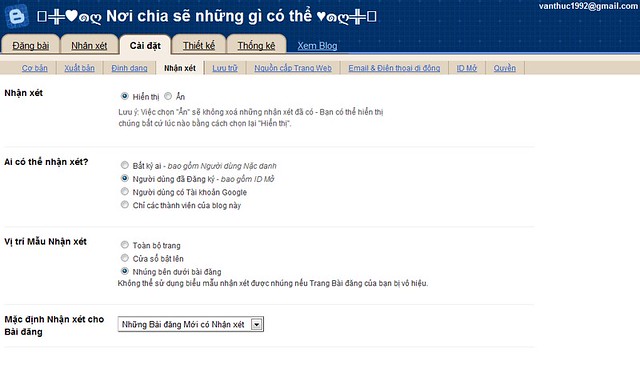
Trước tiên hãy vào http://draft.blogger.com trong phần Cài đặt ,mở tab Nhận Xét


sau đó chọn vào Bài đăng dưới đây đã được nhúng trong phần Vị trí Mẫu Nhận Xét
imageSau đó lưu lại là xong bây giờ bảng comment đã xuất hiện trong blog của bạn rồi đó .
Còn nếu chưa xuất hiện nữa thì bạn hãy vào Chỉnh Sửa HTML ( nhớ lưu lại template phòng trường hợp bị hư còn có thể phục hồi ) , chọn Mở Rộng Mẫu Tiện Ích , rồi kiếm dòng :
<p class='comment-footer'> 
<b:if cond='data:post.allowComments'>
<a expr:href='data:post.addCommentUrl'
expr:onclick='data:post.addCommentOnclick'>
<data:postCommentMsg/></a> </b:if> </p>


thay thế toàn bộ những dòng đó bằng :


<p class='comment-footer'>
<b:if cond='data:post.embedCommentForm'>
<b:include data='post' name='comment-form'/>
<b:else/>
<b:if cond='data:post.allowComments'>
<a expr:href='data:post.addCommentUrl' expr:onclick='data:post.addCommentOnclick'><data:postCommentMsg/></a>
</b:if>
</b:if>
</p>


Sau đó nhấp vào Lưu Mẫu và mở blog bạn lên để xem kết quả .


Còn nếu không được nữa thì hãy tìm dòng sau :

<b:include data='post' name='comments' />

thay thế bằng :

<b:include data='post' name='comment-form'/>


Cuối cùng là lưu lại . Chúc bạn thành công