Dec 28, 2011

Mod Forum Icons cho vbb 4 - Test thành công

Trích từ: tổng hợp thủ thuật vBulletin

Mình đã làm rùi... Ok...
Demo: kenhdaihoc.com 
Link Down
http://www.mediafire.com/?9i19lmcuc89id0m

Chỉ cần Import product là ok luôn :)


Mod ChangUonDyU - Advanced Statistics VB4 6.0.1 (Thống kê bài viết Vbb) - Test thành công

Trích từ: tổng hợp thủ thuật vBulletin

Link tải: http://www.mediafire.com/?np3961gyv9rm3vh
Cách cài đặt 
- Import product
- Sửa template: FORUMHOME
Tìm:
{vb:raw navbar}

Thêm dưới:
{vb:raw changstats}
Ngoài ra các bạn muốn hiện thi ra tất cả các bạn chèn đoạn {vb:raw changstats} vào dưới cùng của navbar.


Trích từ: tổng hợp thủ thuật vBulletin

Mod Tạo Thông báo dạng Popup FORUMHOME vBB - Test thành công


Trích từ: tổng hợp thủ thuật vBulletin

Mod được viết bởi: Mr.Km (Vietvbb)
Mod này đc phát triển từ mod vb3 của Bác Lai bên SVIT

Cài đặt: Import XML xong

Vào Forumhome
Tìm:

{vb:raw navbar}
Thêm bên dưới

{vb:raw mrkm_tbpopup}


Xem ảnh:
Tên:  tb1.png Xem: 11 KT:  3,5 KB

Mod xem thêm bài cùng chuyên mục - View more threads same category 1.2.2 - Test thành công


Chức năng chính của mod này:
  • Hiển thị bài ngẫu nhiên/ xem nhiều/ mới nhất cùng chuyên mục
  • Có tuy chọn hiển thị thời gian post
  • Tùy chọn vị trí hiển thị trên hoặc dưới nội dung post
  • Có tùy chọn tự động thêm vào template hay ko ? (new)
  • Có biến để có thể tự chọn vị trí chèn trong postbit (new)
  • Có Tùy chọn hiển thị prefix của chủ đề (new)
  • Hiển thị bài nào đang được đọc, nếu có trong danh sách (new)


Download:
http://www.mediafire.com/?dsn6lm6iiyis7s5
Trong link download trên có bao gồm cả vb3 và vb4 luôn

Theo chiplove
Trích từ: tổng hợp thủ thuật vBulletin

Mod viết hoa chữ cái đầu tiên của bài viết cho vBB3 -Test thành công

Trích từ: tổng hợp thủ thuật vBulletin

Chức năng chính:
  • Viết hoa chữ cái đầu tiên của tiêu đề + nội dung bài khi gửi bài mới
  • Viết hoa chữ cái đầu tiên khi reply bài + edit bài viết


Hack xong nếu không được thì vào Options -->ChipLove.9xpro - Capitalize the first character of the post và yes, yes nhé 


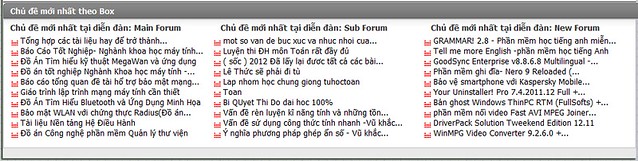
Mod Latest X Threads on Forumhome vbb3( X Chủ đề mới nhất trên ) - Test thành công

Trích từ: tổng hợp thủ thuật vBulletin


Demo: kenhdaihoc.com


Xem thêm hướng dẩn trong file tải về
Chú ý! Khi hack xong nhớ vào
AdminCP >vBulletin Options> vBulletin Options> Last X threads in forumhome forum specific forum(s)
tất cả những tic nào đòi Enable thì các bạn chọn yes nhé

Để hiện được Sub Box thì các bạn chỉ cần điền thông số ID box mà muốn hiện ra cách nhau bằng dấu phẩy (,) nhé!


Installation::.
1 vào admincp -> Plugin System -> Import The Product.
2-mở template FORUMHOME ra

Tìm:
$navbar
Thêm bên dưới:
<if condition="$vboptions[endislastx]">
<table class="tborder" cellpadding="$stylevar[cellpadding]" cellspacing="$stylevar[cellspacing]" border="0" width="100%" align="center">
<thead>
<tr>
<td class="tcat">
<a style="float:$stylevar[right]" href="#top" onclick="return toggle_collapse('developer')"><img id="collapseimg_developer" src="$stylevar[imgdir_button]/collapse_tcat$vbcollapse[collapseimg_developer].gif" alt="" border="0" /></a>
<img border="0" src="$stylevar[imgdir_misc]/subscribed_event.gif"> $vbphrase[ltff]$forumnamedevel
</td>
</tr>
</thead>
<tbody id="collapseobj_developer" style="$vbcollapse[collapseobj_developer]">
<tr>
<td class="alt1">
<table width='100%' cellspacing="0" border="0">
<tr>
<if condition="$vboptions[endislastx1]"><td width="33%" align="left"><img border="0" src="$stylevar[imgdir_misc]/sticky.gif"> $vbphrase[ltfff]$forumnamedevel1</td></if>
<if condition="$vboptions[endislastx2]"><td width="33%" align="left"><img border="0" src="$stylevar[imgdir_misc]/sticky.gif"> $vbphrase[ltfff]$forumnamedevel2</td></if>
<if condition="$vboptions[endislastx3]"><td width="33%" align="left"><img border="0" src="$stylevar[imgdir_misc]/sticky.gif"> $vbphrase[ltfff]$forumnamedevel3</td></if>
</tr>
<tr>
<if condition="$vboptions[endislastx1]"><td width="33%" align="left">$lastxdevelt1</td></if>
<if condition="$vboptions[endislastx2]"><td width="33%" align="left">$lastxdevelt2</td></if>
<if condition="$vboptions[endislastx3]"><td width="33%" align="left">$lastxdevelt3</td></if>
</tr>
</table>
</td>
</tr>
</tbody>
</table><br></if>  

Link down


hoặc
http://www.mediafire.com/?44dxw4uaoqrvpgo
Trích từ: tổng hợp thủ thuật vBulletin

Codeo chữ chạy qua chạy lại, chạy lên chạy xuống

Trích từ: tổng hợp thủ thuật


Bạn copy đoạn mã (code)sau đây bạn thích, rồi past lên blog, Web của bạn ( Chú ý mở HTLM) , đẹp lạ vô cùng!
1/ Chữ chạy từ phải qua trái : 


<marquee > <font size=6 viết nội dung mail</font></marquee>


2/ Chữ chạy từ trái qua phải : 


<marquee direction="right"> <font size=6 color=blue> viết nội dung </font></marquee>


3/Chữ chạy loăng quăng trong màn hình : 


<marquee behavior="alternate"> <font size=6 color=blue> viết nội dung </font></marquee>


4/Chữ chạy lên : 


<marquee direction=up> <font size=6 color=blue> viết nội dung </marquee>


5/Chữ chạy xuống : 


<marquee direction=down> <font size=6 color=blue> viết nội dung </marquee>